- Python 73.7%
- TypeScript 18.9%
- HTML 3.5%
- CSS 2.7%
- FreeMarker 0.6%
- Other 0.5%
| Filename | Latest commit message | Latest commit date |
|---|---|---|
| .github/workflows | ||
| .vite/deps | ||
| docker/keycloak | ||
| scripts | ||
| src_frontend | ||
| tapir | ||
| .env.local.disabled | ||
| .gitattributes | ||
| .gitignore | ||
| .pre-commit-config.yaml | ||
| .prettierrc.json | ||
| .schema.hash | ||
| .sonarcloud.properties | ||
| CONTRIBUTING.md | ||
| docker-compose.yml | ||
| Dockerfile | ||
| LICENSE | ||
| Makefile | ||
| manage.py | ||
| models.png | ||
| openapitools.json | ||
| package.json | ||
| pnpm-lock.yaml | ||
| pnpm-workspace.yaml | ||
| poetry.lock | ||
| pyproject.toml | ||
| README.md | ||
| schema.yml | ||
| sonar-project.properties | ||
| tsconfig.app.json | ||
| tsconfig.json | ||
| tsconfig.node.json | ||
| tsconfig.node.tsbuildinfo | ||
| vite.config.ts | ||
| vite.Dockerfile | ||


Tapir
Tapir is a management system for community supported agriculture. It is currently used productively by several organizations, including WirGarten Lüneburg eG, Möllers Morgen, Gemüsekollektiv Hebenshausen e.V., and more.
Its features include:
- Member & membership management including cooperative shares
- Contract management: yearly commitment, weekly deliveries, solidarity contributions, renewal...
- Communication with the members with customizable automated mails
- Delivery locations and capacity management
- And more
The development is lead mainly by Théo for FoodCoopX.
The backend code is written with Python and Django, the frontend code is a mix of Django templates and React.
Don't hesitate to contact us if you are interested in using or contributing to Tapir.
Getting started
Use docker to quickly get a development server running on your machine. Run the following commands:
docker compose up -d
# Create tables
docker compose exec web poetry run python manage.py migrate
# Define the configuration parameters
docker compose exec web poetry run python manage.py parameter_definitions
# Generate test data
docker compose exec web poetry run python manage.py populate --reset_all
Alternatively, run the reset script: ./scripts/reset_all_containers.sh
You should now have a local instance accessible at http://localhost:8000/. You can log in as admin with username
roberto.cortes@example.com and password roberto.cortes.
You can log in as any user using the same pattern: [name]@example.come as username and [name] as password
Django outside of Docker
You may want to run the Django server outside of Docker, for example if you want to run a debugger or to make it easier to run tests from your IDE. To do that:
- Define a few environment variables: copy the .env.local.disabled file to .env.local, it's content will be read automatically.
- Start the non-django containers, the minimum you need is
docker compose up -d keycloak db redisfor a local Tapir instance, or justdb redisif you just want to run automated tests. - Start the django server with
poetry run python manage.py runserver - Start the vite server with
pnpm run dev
If you want a fresh setup, for example after switching branches, the equivalent of ./scripts/reset_all_containers.sh
is ./scripts/reset_and_start_local_server.sh
Contributing & GitHub issues
You are very welcome to try Tapir locally with the "Getting started" instructions above and do your own thing. The current documentation being basically just this README, you may need extra guidance to get started. Don't hesitate to contact us so that we can give you an introduction.
If you're looking for something to work on, filter the issues using the Ready to be worked on label. Those issues should have a good enough description to get you started. Don't hesitate to ask more questions on the issue directly if needed. If you do, also assign either Theo (for technical questions) or Marcus (for requirements questions) to the issue, so that they know they have to react. They'll assign the issue back to you when the answer is there.
You're of course free to check the other issues and ask questions about them, but be aware that they may not make sense if you're not involved in the daily Tapir-development life. We don't have an internal tool to track tasks yet, so we use the GitHub issues as our todo-list. Hopefully the labels will be enough to let you sort through the mess.
Bäckerei (bakery)
The bakery is off by default. For a local instance with it switched on and
filled with test data — a bakery with one Brotanteil share, four pickup
stations, breads and members:
docker compose exec web poetry run python manage.py populate --reset_all --org=bakery
The baking-plan solver needs ortools, the optional bakery extra in
pyproject.toml. The Docker image installs it (poetry install --extras bakery); without it the solver endpoints
answer 503.
Tests
Tests are run with pytest:
docker compose exec web poetry run pytest --reuse-db -n auto
If you run into troubles while running the tests, try running them without --reuse-db -n auto.
You can run unit tests outside the Docker container with just by simple running pytest, assuming you have the poetry
environment installed and activated. That should be a bit faster. Integration tests must be run from inside Docker.
Keycloak during tests
User authentication is handled by keycloak through django-allauth. During integration tests, this connection is mocked
via tapir.wirgarten.tests.test_utils.mock_keycloak, called in TapirIntegrationTest. The mocking happen during
setUp and setUpTestData happens before setUp, that means we can't create users inside setUpTestData.
Formatting
Python files are formatted with Black.
JavaScript and React files are formatted with Prettier.
Django template files are formatted with DjHTML
Install the pre-commit hooks to make sure that the files you commit are properly formatted:
poetry run pre-commit install. It should be possible to configure your IDE of choice to run the formatting
automatically on save, at least for Black and Prettier. Look in their respective documentation.
Frontend API clients
API Requests made from the React frontend use API clients. Here are the steps to get updated API clients:
- Annotate your API view with Spectacular (search for
@extend_schema(for examples) - Generate the API schema file with
python ./manage.py spectacular --file schema.yml - Generate the TypeScript API clients using OpenAPI Generator with
./scripts/generate_api_clients.sh
There are help scripts in the /scripts folder. You can do a full update with the following command:
docker compose exec web ./scripts/generate_api_schema.sh && docker compose exec vite ./scripts/generate_api_clients.sh
Style and conventions
Models
Models should inherit from tapir.core.models.TapirModel:
- It uses nanoid instead of integer IDs, that makes sure we never use an ID from a model when getting another model, for example in tests.
- It has
created_atandupdated_atfields that help unterstand the state of production databases.
As much as possible, model classes should contain only their own fields. Helper methods are OK if they only reference the fields of the given object.
Cache
Many functions, especially service functions, take a cache parameter which is a normal python dictionary. The goal of
this cache is to avoid redundant database requests within one http request: in most of our views, DB requests are the
most time-consuming part. The cache dictionary should be created at the origin point: for example in the view's
__init__ function or the first lines or the command. Since this cache only lives for the duration of the request, in
most cases it is not necessary to invalidate it. If you do need to invalidate, look at
tapir.utils.services.tapir_cache_manager.TapirCacheManager
Some functions have the cache parameter optional. This is only because they are called in legacy code, all new functions
should have the cache parameter required if possible. For examples, see usages of
tapir.utils.services.tapir_cache.TapirCache.
Service classes
Most of the business logic code should be in service classes. You can find examples in tapir/*/services/.
Commits
Use conventional commits for your commit messages. When applicable, add the ID of the related GitHub issue in the commit message.
Legacy code
Everything that is under tapir/wirgarten should be considered legacy code. It doesn't respect the conventions above. If you need to change anything in there, consider rewriting the part that you are changing and moving it to one of the other apps.
Mailing lists
An optional integration with Mailman can be activated by setting MAILING_LISTS_ENABLED to True. The URL, username and
password parameters must be set (see MAILMAN_* in settings/base.py).
If you want to test the integration locally, you can use the following docker-compose file, it creates the following services:
- Mailman API at localhost:8001/3.1/
- Mailman web UI at localhost:8002 (the user's email is admin@example.com, use the password reset function to set it. The reset mail will be accessible in Mailpit)
- Mailpit at localhost:8025
Docker compose mailman
services:
  mailman-core:
    image: maxking/mailman-core:0.5
    container_name: mailman-core
    hostname: mailman-core
    restart: unless-stopped
    volumes:
      - /opt/mailman/core:/opt/mailman/
    stop_grace_period: 30s
    links:
      - database:database
    depends_on:
      database:
        condition: service_healthy
      mailpit:
        condition: service_started
    environment:
      - DATABASE_URL=postgresql://mailman:mailmanpass@database/mailmandb
      - DATABASE_TYPE=postgres
      - DATABASE_CLASS=mailman.database.postgresql.PostgreSQLDatabase
      - HYPERKITTY_API_KEY=someapikey
      # Route Mailman Core's outgoing mail through Mailpit instead of a real MTA
      - SMTP_HOST=mailpit
      - SMTP_PORT=1025
    ports:
      - "127.0.0.1:8001:8001"  # API
      - "127.0.0.1:8024:8024"  # LMTP - incoming emails
    networks:
      mailman:

  mailman-web:
    image: maxking/mailman-web:0.5
    container_name: mailman-web
    hostname: mailman-web
    restart: unless-stopped
    depends_on:
      database:
        condition: service_healthy
      mailpit:
        condition: service_started
    links:
      - mailman-core:mailman-core
      - database:database
    volumes:
      - /opt/mailman/web:/opt/mailman-web-data
    environment:
      - DATABASE_TYPE=postgres
      - DATABASE_URL=postgresql://mailman:mailmanpass@database/mailmandb
      - HYPERKITTY_API_KEY=someapikey
      # Route Mailman Web's outgoing mail (password resets, notifications, etc.) through Mailpit
      - SMTP_HOST=mailpit
      - SMTP_PORT=1025
      - SERVE_FROM_DOMAIN=localhost
      - MAILMAN_ADMIN_USER=admin
      - MAILMAN_ADMIN_EMAIL=admin@example.com
      - SECRET_KEY=some_secret_key
    ports:
      - "127.0.0.1:8002:8000"  # HTTP
      - "127.0.0.1:8082:8082"  # uwsgi
    networks:
      mailman:

  database:
    environment:
      - POSTGRES_DB=mailmandb
      - POSTGRES_USER=mailman
      - POSTGRES_PASSWORD=mailmanpass
    image: postgres:12-alpine
    volumes:
      - /opt/mailman/database:/var/lib/postgresql/data
    healthcheck:
      test: [ "CMD-SHELL", "pg_isready --dbname mailmandb --username mailman" ]
      interval: 10s
      timeout: 5s
      retries: 5
    networks:
      mailman:

  # Local test mail server: captures all outgoing mail from Mailman
  # instead of delivering it, so nothing escapes to real inboxes.
  mailpit:
    image: axllent/mailpit:latest
    container_name: mailpit
    restart: unless-stopped
    ports:
      - "127.0.0.1:8025:8025"  # Web UI - view captured messages at http://localhost:8025
      - "127.0.0.1:1025:1025"  # SMTP server - Mailman delivers here
    networks:
      mailman:

networks:
  mailman:
    driver: bridge
    ipam:
      driver: default
      config:
        - subnet: 172.19.199.0/24
Class diagram
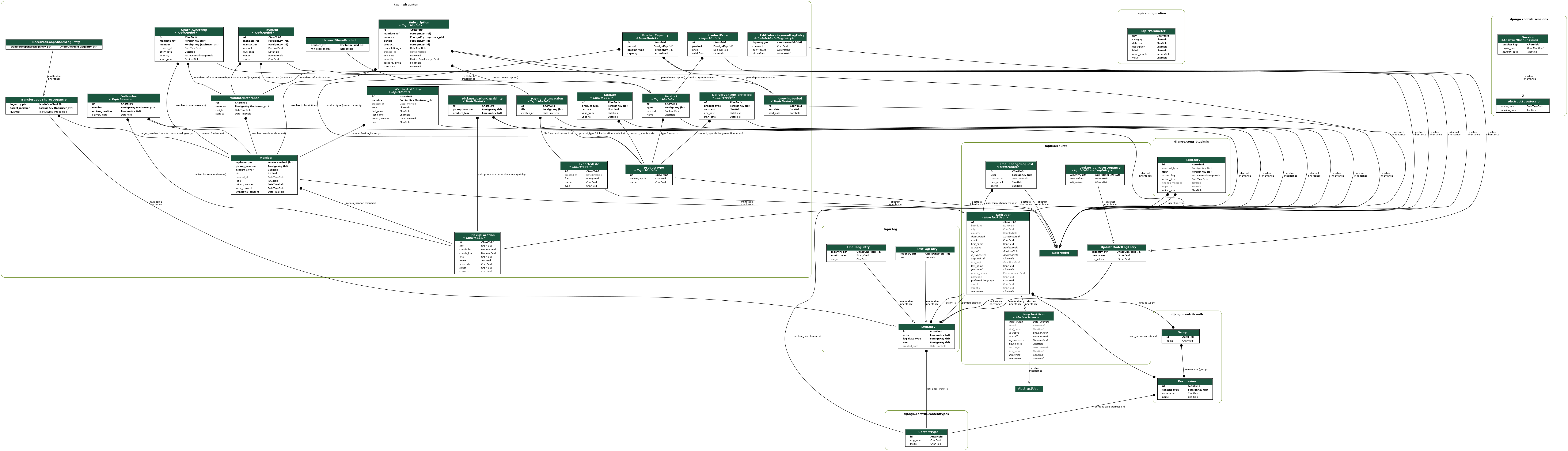
If this graph is outdated, you can re-generate it with:
docker compose exec web sh -c "apt update && apt install -y graphviz graphviz-dev && poetry run pip install pygraphviz && poetry run python manage.py graph_models -a -g -o models.png"
The other Tapir
This Tapir started as a fork of another project: Tapir for cooperative supermarkets. They are now completely separate but have kept the same name. Sorry for the confusion!